
STEP1Web booking
User groups select date and time on the web to book.

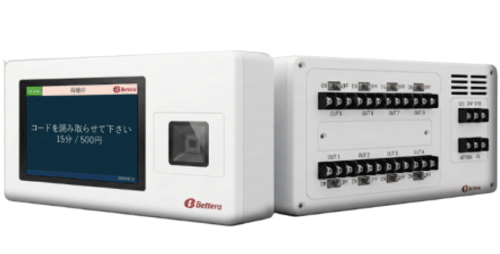
Payment terminal CD1AC (design may change without notice)
Organizations log in via web, select a time, and pay online.
HVAC turns on at the booked start time and stops at the end time.
Each organization signs in with its assigned ID and password to book available gym slots.
Bookings are stored on the server; HVAC opens at the start and stops at the end.
Data is managed securely on AWS cloud so local governments can monitor usage and school-level operations on site.
You can also manage organization booking status.
User groups select date and time on the web to book.
When using the air conditioning, pay online with an available payment method.
Manage bookings and payment status centrally in the cloud.
Automatically retrieves booking data from the cloud.
Starts control at booking time and stops at end time
Select the area you want to charge, then operate it on the screen.
Scan your mobile payment code on the billing screen.
HVAC becomes available for use.
Municipal staff can monitor usage.
Collecting HVAC fees is cumbersome
Cash handling feels risky
HVAC is sometimes left running
Usage is hard to track
| Body color | White (matte finish) |
|---|---|
| Material | ABS resin and others |
| Dimensions | Rounded square (H 120 mm × W 240 mm × D 50 mm) |
| Input | AC100V, 24-hour power-loss hold, external contact BUSY |
| Output | Dry 8AB contact with forced switch (rated DC24V/1A) |
| Other | Standard free operation via a free code (on/off, end time, and duration), with an end alert by buzzer or on-screen display. |
Simple UI for easy operation
Supports multiple QR payment methods for smooth checkout
Automatic control based on booked times
Connect to terminals controllable via dry AB contacts
Runs on trusted AWS infrastructure
Install built-in in the required distribution panel such as a remote control panel
Supports AC100V input voltage
Built-in SIM slot—install where cellular signal is available
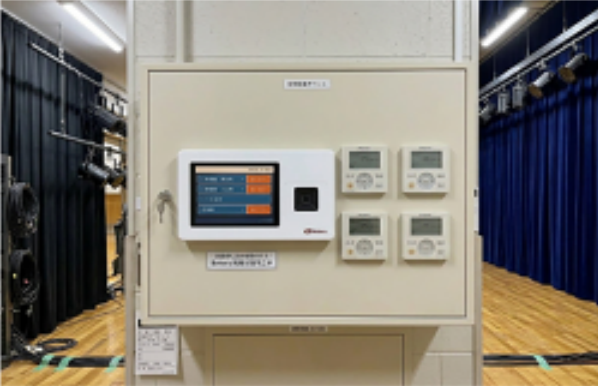
The built-in design allows a space-saving installation.


Please confirm available payment methods before use. Some brands may not be available due to payment provider review requirements.